Taxes Zone 7 Dhaka job circular 2026 posted today: a TAX7 job circular online. Apply now at https://tax20.teletalk.com.bd. TAX7.teletalk.com.bd admit card download notice and Job result are published by www.taxeszone7dhaka.gov.bd. Job finder also gets Taxes Zone 7 Dhaka job and all Government jobs circular on my website at www.ejobsresults.com. People searching for Taxes Zone 7 Dhaka Job Vacancy Notice, check this post carefully.
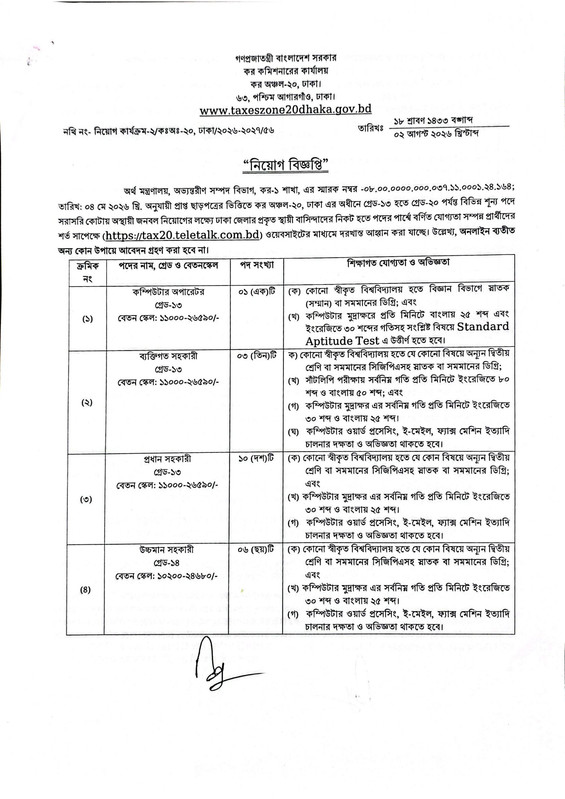
According to the National Board of Revenue, Dhaka, under the High Court Division of the Inland Resources Division of the Ministry of Finance, online applications are being invited from permanent residents/citizens subject to one of the conditions for direct recruitment of manpower temporarily in the Tax Zone 3 Dhaka vacancy.
The Dhaka Tax Commissioner’s Office is inviting applications from the residents of the regular district town under the Dhaka Division for the temporary recruitment of all manpower on a temporary basis against the vacant posts. Eligible candidates are asked to apply online. Online application link: https://tax20.teletalk.com.bd. Don’t upset ejobsesults.com will update all notices about job seekers who want to get the Taxes Zone 7 Dhaka job circular 2026.
TAX7.teletalk.com.bd job circular 2026
Taxes Zone 7 Dhaka is a tax office under the National Board of Revenue (NBR) in Bangladesh. It collects taxes from people and businesses in its area. The office deals with income tax and other tax-related matters. It also helps taxpayers with registration, tax return filing, and other services.
Tax Zone 7 Dhaka has an office in Dhaka city. Taxpayers can contact the office for tax services and information. The office location and contact details may change. So, taxpayers should check the official NBR website for the latest address and contact information.
Taxes Zone 7 Dhaka Job circular 2026 – TAX7.teletalk.com.bd
Most of the people are looking to get a Govt job like the Taxes Zone 7 Dhaka job circular 2026. Recently, Taxes Zone 7 Dhaka published a new job Vacancy on their website. Taxes Zone 7 Dhaka is looking for some new workers for their Organization.
Vacancy No.: 47
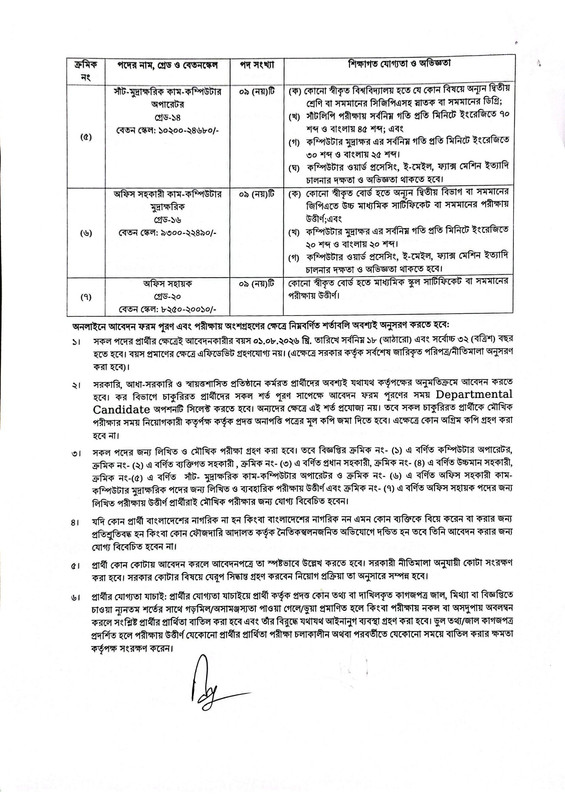
Post name: Computer Operator – 01, Personal Assistant – 03, Head Assistant – 10, Upper Division Assistant – 06, Steno Typist Cum Computer Operator – 09, Office Assistant Cum Computer Typist – 09, Office Support Staff (Office Sohayok) – 09
Type of Jobs: Full Time
Job Category: Govt jobs
Educational Requirements: JSC/Graduation
Salary: 7,250 – 30,230 Taka
Age limits: At least 17 years to 30 years
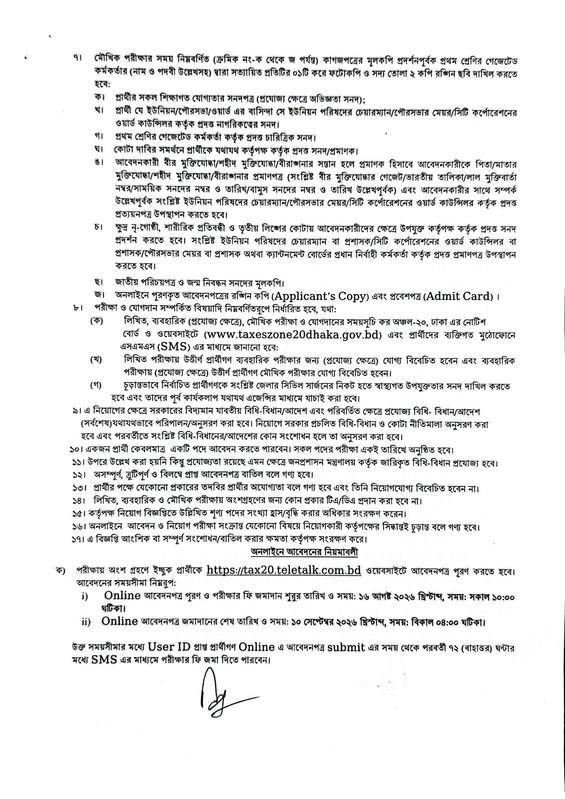
Circular Posting Date: 11, August, 2026
Application start date: 16, August, 2026
Application Fee: 56/112 Taka
Deadline: 10, September, 2026
Online Apply Link: https://tax20.teletalk.com.bd
Official website: www.taxeszone7dhaka.gov.bd
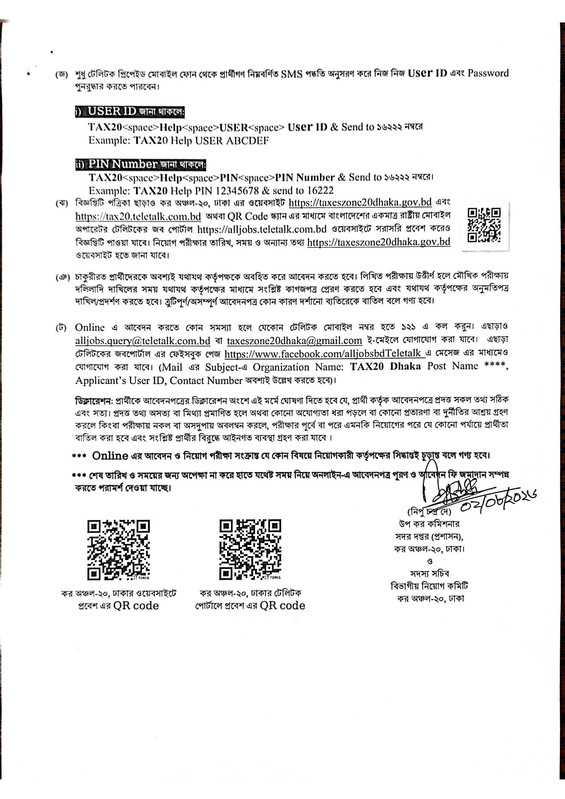
How to Apply Online: https://tax20.teletalk.com.bd
Only eligible Job candidates can apply for https://tax20.teletalk.com.bd is now very easy. Taxes Zone 7 Dhaka job candidates can easily apply for any govt jobs by visiting Teletalk’s official website at https://tax20.teletalk.com.bd. If you have completed your registration for Taxes Zone 7 Dhaka, check the instructions below.
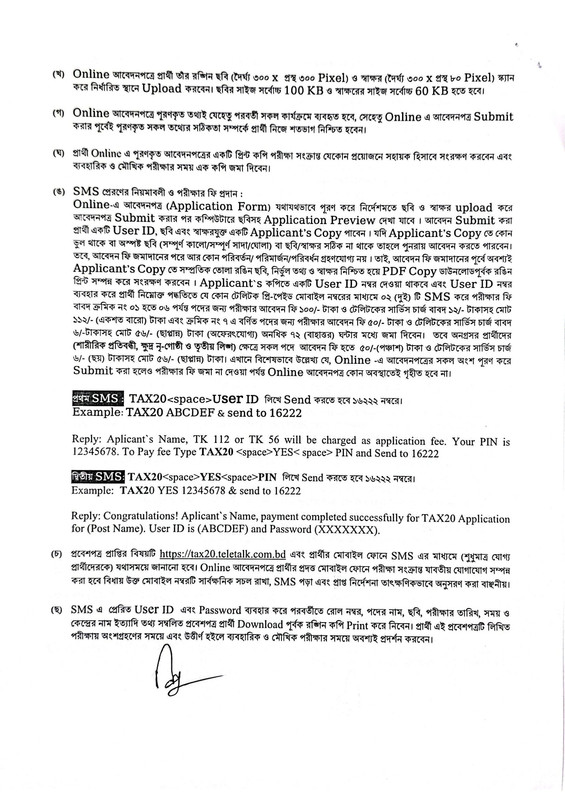
- First, collect a color Photograph 300×300 pixel JPG format, under 100KB) and a signature for TAX7 jobs.
- Then visit the official site: https://tax20.teletalk.com.bd. (Job Application Link)
- TAX7 Application form
- Select your TAX7 job post.
- You should fill out all information correctly.
- Upload your photo and signature.
- Finally, submit the TAX7 Application.
- Download your TAX7 copy and print your Application copy for future reference.
- Complete the payment on Teletalk mobile within 72 hours.
Online Apply Now: https://tax20.teletalk.com.bd
TAX7 job SMS Payment System for TAX7 Teletalk
Many people don’t know how to TAX7 payment online for a job application. Ejobsesults.com website helps you complete the TAX7 Online job application process. Let’s check the TAX7 Teletalk SMS format below.
- First SMS: TAX7 User ID Send to 16222
- For example, TAX7 453564 and send to 16222
When you pay fees for the TAX7 job, then you will get a reply SMS; here you will be found 7 digit pin code, then the candidate will send the second SMS. After reply: Applicant’s Name, you charge as Tk-56/112 application fee. Your PIN is (7-digit number).
Second SMS format:
- Second SMS: TAX7 Yes PIN and send 16222
- For example, TAX7 YES 5454322and sendd 16222
Then you will get another reply: Congratulations! Applicant’s Name, payment completed successfully for Taxes Zone 7 Dhaka (TAX7). Later,r User ID is (xxxxxxxx) and Password (xxxxxxxx).
TAX7.teletalk.com.bd Admit Card Download 2026
Taxes Zone 7 Dhaka official website will publish soon Job exam Date at https://tax20.teletalk.com.bd. Our website’s next post about the TAX7 Admit Card Download link is https://tax20.teletalk.com.bd. Only eligible persons will be notified in the joint meeting via SMS on the official website https://tax20.teletalk.com.bd/ and the candidate’s mobile phone for downloading the admit card after the application deadline.
The same admission will be held in written and oral form. Candidates applying online will be informed about the examination information on the appropriate mobile phone. Therefore, the number must be kept open. Then you will be able to download your TAX7 Admit Card and prepare for the Written Exam in 2026. Please collect your user ID and password to download your Admit Card.
I hope you complete all steps about the TAX7 Job circular 2026. Taxes Zone 7 Dhaka Job Vacancy Notice was collected from the daily newspaper and the official website of https://tax20.teletalk.com.bd.Thanks for reading our TAX7 job circular post on my website.